@唐巧_boy: //@_calphy:Mark
@华哥评论: 目前北京妈妈圈里流传着一份15分钟的线上问诊记录录音,大夫是协和医院儿科副主任医师李主任,讲解地非常细致、中肯,我根据问诊录音整理了文字概要,分享给大家,希望能帮助到焦虑的妈妈们,真的阳了也不要怕,心中有数,沉着应对。
1.除了退烧药,不需要使用任何药物,过度用药反而容易出问题,儿童不需要镇咳,中成药不要服用。
2.睡着了 不需要叫起来吃退烧药,烧不出脑炎肺炎心肌炎等问题,让孩子继续睡,是我们的重要选择。
3.一般焼3天左右,第二天最高,抵抗力好的第二天就会降温。
4,退烧药阻挡不住高热惊厥的发生,高热惊厥发生在前12小时,如果12小时后没有高热惊厥,基本不会发生。
5.发热时,从呼吸道和皮肤水分流失特别快,水分给到位是最重要的第一条,充分休息,是最好的治疗方法。
6.退烧药美林、泰诺选一种用,1岁以下不建议两种都用,肾脏无法负荷。24小时不超过4次。
7退烧药退不下来也没关系,退不下去不追加服用退烧药。
8;退烧后开始咳嗽,不用镇咳。有鼻涕可以用生理盐水、海盐水。
9.中成药没有母乳安全喂养级别,布洛芬可以安全哺乳。
10.体温上升时身体发抖或手脚冰凉,不要泡澡,儿童会不舒服。
11.物理降温:不用泡澡擦身,少穿少盖,降低环境温度就可以。温水擦拭可能加重儿童不适,降温贴也容易过敏。
12.少吃多餐,多喝水、奶、粥、汤面等有液体的东西,冷的热的都行,孩子愿意吃就可以。
13.呕吐没关系,不耽误吃。化整为零,全天保证水分和能量,原来可以吃的食物仍旧可以吃,没必要压缩食物种类,不能只喝粥,没营养,什么都能吃。
14.这种情况容易出问题:家长不给吃不给喝硬扛,尿黄,拿包被捂汗,容易出心肌炎、脑炎、肺炎等严重问題。
15,感染后3-6个月不会重复感染,除非感染其他亚型病毒。
16.环境的消毒,都比不过手部消毒。
17.人体转阴,环境中的病毒也消失了,不需要大规模消杀。
18.一家人不太容易不被传染,都感染后,在家不用再戴口罩。
https://m.weibo.cn/1708947107/4846719206424944
2022年12月11日星期日
https://colube.cn/
龙爪槐守望者 @ftium4
2022-10-29 13:29
Colube —— 带结构的白板笔记
链接:https://colube.cn/
和海外的 heptabase 有点像,笔记以白板的形式自由摆放,同时也可以通过连线和内嵌组织,便于梳理和打造知识网络。 https://twitter.com/ftium4/status/1586228788022562817/photo/1
https://twitter.com/ftium4/status/1586228788022562817
2022-10-29 13:29
Colube —— 带结构的白板笔记
链接:https://colube.cn/
和海外的 heptabase 有点像,笔记以白板的形式自由摆放,同时也可以通过连线和内嵌组织,便于梳理和打造知识网络。 https://twitter.com/ftium4/status/1586228788022562817/photo/1
https://twitter.com/ftium4/status/1586228788022562817


关于新冠喉咙剧痛的生物原理和缓解方案——


#伯爵冷知识# 从本质上讲,新冠能够引起患者喉咙远超感冒的剧痛感,究其原因是新冠病毒在咽喉部位造成了小型白介素免疫反应➠➠➠引起喉咙部位的血管通透性增高,细胞成分&组织液渗出导致肿胀,进而持续压迫神经末梢,最终导致剧烈的咽喉疼痛,
更要命的是,新冠会促使人体免疫系统释放炎症介质(PGE2等等),这些化学物质可以直接刺激人类神经末梢,加重疼痛感。
由于新冠造成的局部免疫反应要比禽流感强的多,所以新冠喉咙痛就有了【刀片过喉】的江湖匪号。
惹不起。
——————————————
而面对病毒型炎症,人类没办法像解决细菌感染那样用抗生素一劳永逸的治本,我们只能是想办法缓解。
比如,避免摄入增加血管通透性的食物——洋葱(目前已知唯一含有前列腺素A的食材),以及葱姜蒜辣椒等食材,越吃这些刺激性食材,喉咙越肿痛。
想办法摄入降低血管通透性的食物——西红柿,它含有维生素P,也就是一种特殊黄酮苷C27H30O16,可以抗炎、抗过敏和抗病毒,同时还可以增强和保护维生素C的抗氧化作用。
所以朋友们可以吃【西红柿拌白糖】(加糖是为了减轻西红柿有机酸对喉咙黏膜的刺激),糖尿病患者直接生吃西红柿(去皮或者洗干净),用来缓解新冠喉咙剧痛症状。
请大家参阅。
https://m.weibo.cn/2275284204/4845452970691572
2022年11月20日星期日
佳能Canon打印机G3800出现5B00错误代码提示,处理办法,G2800出现5B00废墨清零G1800出现5B00废墨清零G2810出现5B00废墨清零
使用佳能打印机时,经常会出现打印机错误,错误号码:5B00。出现这个错误的原因是打印机的废墨垫使用寿命已经达到了,系统芯片记录海绵吸收废墨计数达到临界值,所以会提示5B00的警告,解决方法也很简单分两步。以下方法适合于佳能G1800 、G2810、G2800、G3800、MP250等型号的打印机提示5B00清零。一、进入维修模式:1、 放几张纸到打印机,关闭打印机电源,先按【取消/停止】键不松手,然后紧接着按 【电源开关】 键也不松手。2、电源灯绿灯时,只松开【取消/停止】按键,然后按【取消/停止】键5 次,接下来同时松开【电源开关】【取消/停止】键。3、这时打印机会自检查一次,当电源指示灯绿灯长亮时说明已经进入维修模式。二、废墨计数清零:1、维修模式下,连续按6次【取消/停止】按键,每按一次会在黄灯绿灯之间来回切换。2、再连续按3次【电源开关】按键,绿灯会闪烁几下后自动关机。3、最后按【电源开关】 键重启,完成清零,佳能打印机5B00问题的就解决了。网上很多说使用软件清零的,实现根据不需要软件打印机出厂时就已经预设手动清零的设置,只是非专业人员不知道。
2016年8月24日星期三
忘记Google APP(谷歌企业邮箱、日历等)账号密码解决方案
Google的APP的确不错,特别是他们的免费的企业邮局,及谷歌企业邮箱,非常的好用。
我每个域名差不多都已经申请了他们的企业邮局。但是往往企业邮局多了,又闲置了,不经常使用,长期的忘记密码,更郁闷的是经常会忘记管理员帐户,我每个信箱的管理员帐户差不多都不一样,然后你选择忘记密码提示,直接显示与域名管理员联系,无法取回密码。这个时候怎么办?
其实很简单,大家用这个链接:
https://www.google.com/a/cpanel/your_domain.com/VerifyAdminAccountPasswordReset
把 your domain.com 换成你自己的域名。
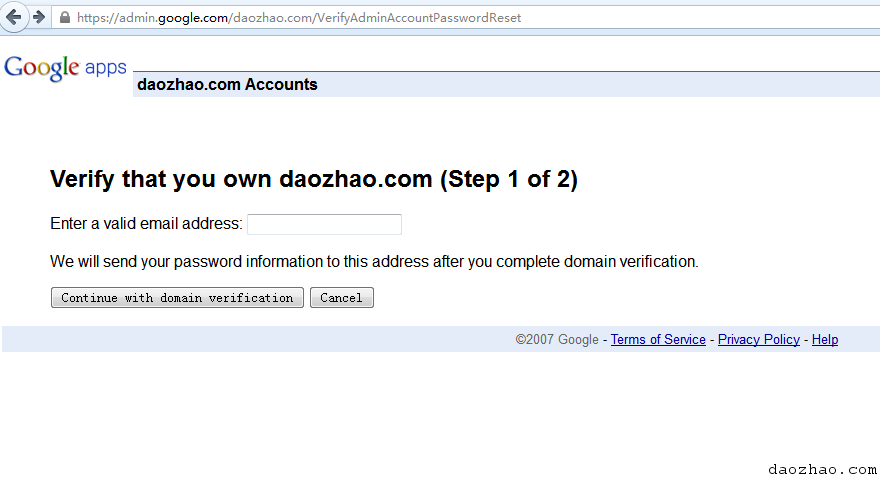
然后重新再做一次CNAME的指向,48小时内就会取得你的管理员用户名以及密码了。

2016年5月22日星期日
How to Batch Convert DOC files to PDF format Using Mac OSX Automator
Article No. 8 View the 37 Comments
Category: Power Tools May 25, 2010 How to Batch Convert DOC files to PDF format Using Mac OSX Automator
Our clients often request an area on their website for sharing business and promotional documentation. They also sometimes require that this content be available to the public via downloads. This request is often followed up by an email containing a zip archive of any number of .doc formatted files, with something like “Please convert these files to .pdf format for the website” in the subject.
Of course there are many methods and utilities in the wild for performing this type of file format conversion, however we were looking for a method that would batch process the files most efficiently, preferably without downloading or buying any additional software.
Below is a simple step by step solution for converting the format of doc files using Automator for Mac OSX. You can download the workflow at the end of this article.
Open Automator.
Create a new custom workflow.
From the Actions panel library, select Files & Folders then double-click Get Specified Finder Items.
Add the items you wish to convert.
Next, from the library, select Documents, then double click Convert Format of Word Documents.
From the dropdown menu, select the format you wish to convert the files to. In our case we select Portable Document Format (PDF)
Now we are ready to run the action. Click the run button in the top right of the automator window.
The new converted files are converted and saved using the original file name and file location.
Open up your destination folder and verify your files have been successfully converted.
This method for file conversion is not limited to converting .doc files to .pdf but can be modified to work with most file formats. Furthermore the Autormator application can be used to create more complex workflows where files can be moved, renamed, sorted etc.
In addition to providing a simple method for performing basic automation, after getting to know the Automator interface and discovering all its capabilities, you will find that it is perhaps one of the most useful but overlooked utility applications available for the mac OSX.
The best part: we achieved our goal to batch convert the files efficiently, we utilized a tool that we already have access to use, and by using this method we can build more complex workflows, and save and reuse them the next time we get the same request from a client.
Download the sample workflow:
Automator File Conversion Workflow
http://aseriesoftubes.com/articles/how-to-batch-convert-doc-files-to-pdf-format-using-mac-osx-automator/
订阅:
博文 (Atom)